Connect

Link your brokerage.
Read-only.

Bring Interactive Brokers, Schwab, Robinhood, Binance and 20+ other global brokerages into your Wealth Atlas net worth. Connections run through SnapTrade, are read-only, and your brokerage login is never stored.

Connecting Interactive Brokers
Wealth Atlas app showing a combined net worth
Read-onlyWe can never trade or move money
SnapTradeDisconnect at any time
How it works

A few taps from the app.

Every brokerage starts the same way. Interactive Brokers adds one extra step, shown below.

1

Add an account

On Home, tap Add Asset, then choose Add an offshore account.

2

Connect with SnapTrade

On Connect Offshore, tap Connect with SnapTrade and pick your brokerage.

3

Approve read-only access

Sign in on your brokerage's own page, or follow its steps, and approve. Wealth Atlas never sees your password.

4

Holdings sync

You're returned to the app and your stocks and ETFs appear as a portfolio, marked Live.

Interactive Brokers

Connecting IBKR, step by step.

Interactive Brokers shares account data with apps through its Third-Party Reports service rather than a login screen. You turn on SnapTrade inside IBKR once, and IBKR gives you two codes to paste back. It takes about five minutes.

Do steps 2–4 on a computer or in a mobile browser at interactivebrokers.com (Client Portal). The IBKR mobile app doesn't show these settings.

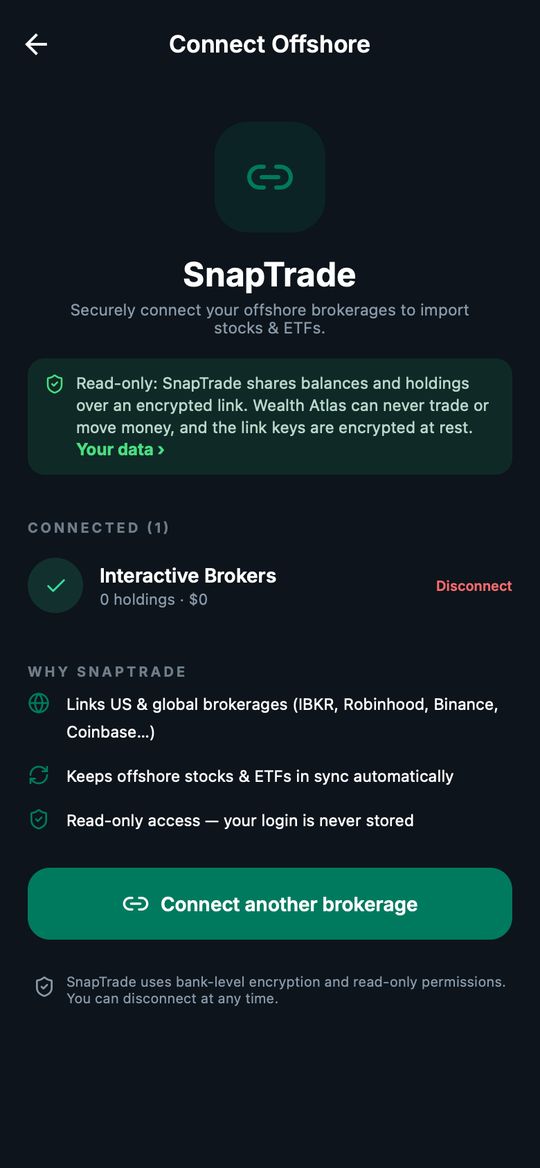
The Connect Offshore screen in Wealth Atlas: SnapTrade, a read-only notice, a connected Interactive Brokers account with a Disconnect option, and the Connect another brokerage button
Connect Offshore in the app. Before your first link the button reads Connect with SnapTrade; once you're linked, each brokerage is listed with Disconnect.
1

Start in Wealth Atlas

On Home, tap Add Asset → Add an offshore account → Connect with SnapTrade, and choose Interactive Brokers. Keep this window open.

2

Sign in to IBKR Client Portal

In another tab or on a computer, sign in to Client Portal with your usual IBKR login and two-factor.

3

Open Third-Party Services

From the top menu:

Performance & Reports›Third-Party Reports›⚙ Configure Third-Party Services

IBKR sometimes moves this. If you don't see it, look under Settings › Reporting, or search Client Portal for “Third-Party”.

4

Turn on SnapTrade and copy the two codes

Find SnapTrade in the list and switch it on. IBKR then shows:

Query ID6–7 digits
Token24 digits

If IBKR offers a choice of how long the token lasts, pick the longest (up to a year), so you don't have to reconnect soon.

5

Paste them into SnapTrade

Back in the Wealth Atlas window, paste the Query ID and Token and confirm. You'll land on a “Brokerage connected” page; tap ✕ to return to the app.

6

Your first sync

IBKR prepares this data as a daily report, so your holdings appear after IBKR's next report, usually within a day. After that, Wealth Atlas refreshes your IBKR holdings every evening.

Your data

What we can and can't see.

We see

Your positions, cash balances and account currency, so your net worth, allocation and dividends are complete.

We can't

Place trades, move money or withdraw. Brokerage links are read-only, and your brokerage login is never stored by Wealth Atlas.

Disconnect any time

In the app: Add Asset → Add an offshore account → Connect Offshore → Disconnect. For IBKR you can also switch SnapTrade off in Third-Party Services, which stops the reports at the source.

How it's protected

Connection secrets are encrypted at rest, never logged, and only used to read your holdings. See our privacy notice.

Supported

Brokerages you can link.

Through SnapTrade. NSE accounts are added from a CDSC statement, an Excel file or a photo instead.

Interactive BrokersCharles SchwabRobinhoodBinanceCoinbase& 20+ more

Binance: SnapTrade reads your Spot wallet. Coins in Funding, Earn or staking don't come through. Move them to Spot, or add them in the app by hand under Add Asset.

Questions

If something doesn't look right.

“Connection needs re-authentication”

Your brokerage has ended the link, usually because a password changed or, for IBKR, the token expired. Tap the connection and reconnect; for IBKR, generate a new token in Third-Party Services.

“Connected · no holdings yet”

The link worked but the first report hasn't arrived. For IBKR this is normal on the first day. Pull down on Connect Offshore to refresh later.

Numbers lag the market

Brokerage holdings refresh once a day in the evening (East Africa Time). Prices for your other holdings update through the day.

Still stuck?

Email [email protected] with your broker's name and what you see. Never send us passwords or codes.

Get the app

Connect your first account.

Read-only, private, yours.